Advertising

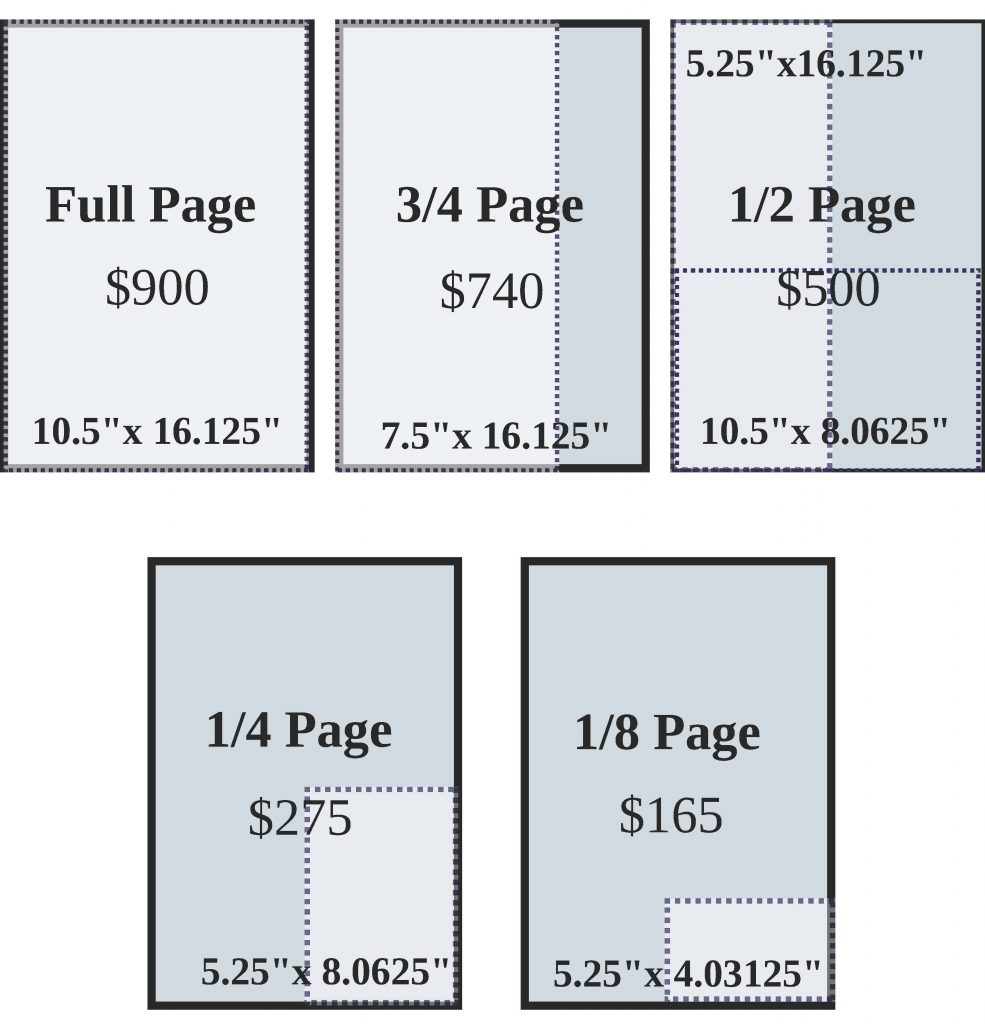
The best way to get information about advertising is to download our Official Advertising Guide. It contains all the information you need about placing display, online, insert and classified advertising, as well as a full publication calendar, Drexel community demographics, and contact information.

Print

2012-2013

For the 2012-2013 academic year, The Triangle has maintained our expertly priced rates, and introduced “Premium Issues” with additional run counts, allowing your message to be exposed to a wider audience.

Download the 2012-2013 Print Advertising Guide Download the 2012-2013 Premium Issue Advertising Guide

You will need a PDF viewer, such as the free Adobe Reader to view our advertising rate cards.

Online

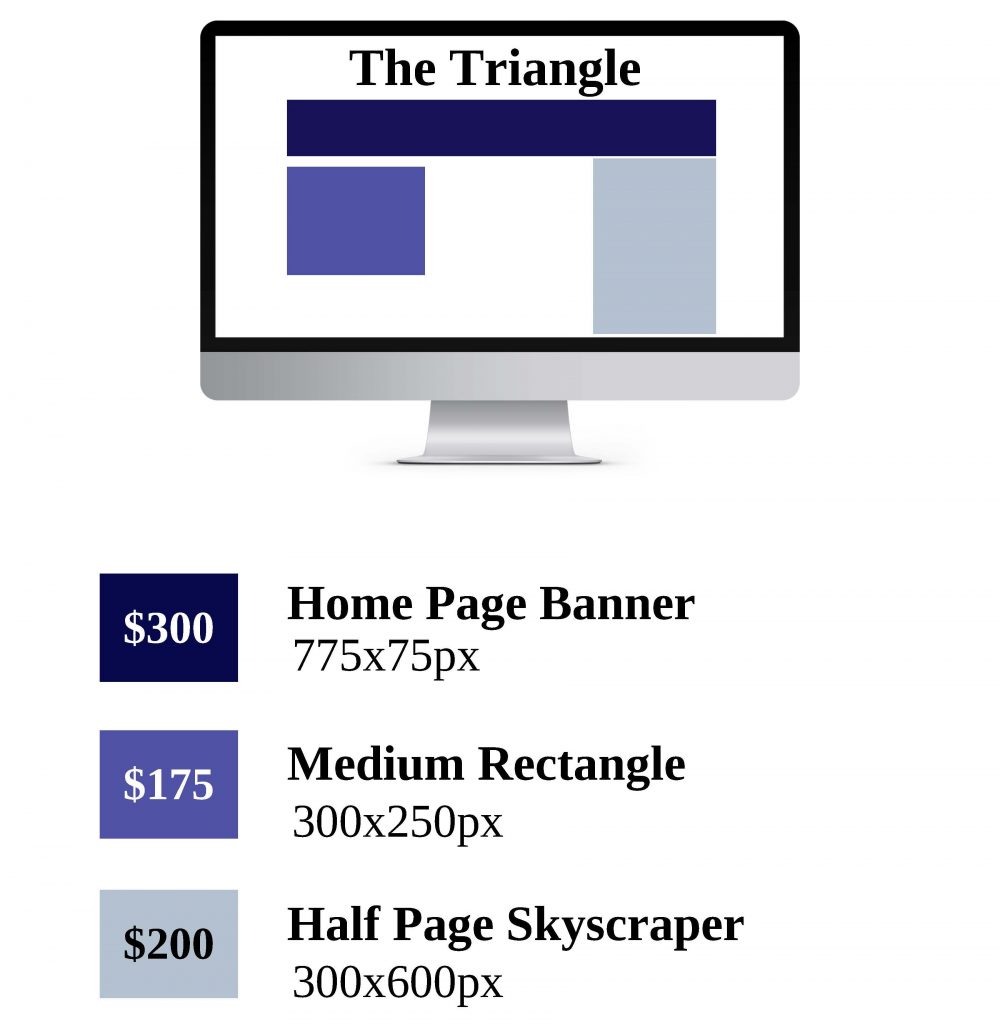
Online ads are now available on thetriangle.org! View our online advertising rate card for more information.

Download the 2012-2013 Online Advertising Guide


You will need a PDF viewer, such as the free Adobe Reader to view our advertising rate cards. If you are unable to download the guides, please send the Advertising Department an email at advertising@thetriangle.org or call 215.895.2689 and we can either fax or send you a copy.

Advertising Deadlines

Display – The deadline for placing display advertising is 5:00 p.m. EST on the Monday before the targeted issue. Artwork is also due 5:00 p.m. EST on the Tuesday before the targeted issue.

Classifieds – The deadline for placing classified line and classified block ads is 5:00 p.m. EST on the Tuesday before the targeted issue. All classified ads must be submitted via our online classifieds system, and be pre-paid.

Online – The deadline for placing online ads is 5 business days prior to the date you would like to begin running the ad on the website.

Inserts – The deadline for placing a Free Standing Inserts is noon on the Friday before the targeted issue. Inserts must be delivered to our printer by the Monday before the targeted issue, but at least 5 business days before the issue date is preferred. Please email our advertising department for more information.

Print Artwork Requirements

All artwork for display ads must be “Print Ready”, sized correctly, at least 300 DPI, and in CMYK process color format. No spot colors are allowed. Artwork should be in one of the following file formats: PDF (preferred), AI, EPS, PSD, TIFF, PNG,  or JPG.  Artwork can be emailed to advertising@thetriangle.org

When creating “Print Ready” artwork, please do not use Microsoft Office programs such as Word and PowerPoint, as these programs do not produce print quality (300 DPI or greater) artwork. DOC, DOCX, PPT, and PPTX files are NOT accepted, even if converted to PDF.

Recommended programs to use include, Adobe InDesign, Adobe Photoshop, Adobe IllustratorQuarkXPress, CorelDRAWGIMP, Paint.Net, or Inkscape. All of these programs can create correctly sized, “Print Ready” art in CMYK color format at 300 DPI or greater, when the correct settings are used.

If you are not sure if you have print ready art, a quick litmus test is to see if there is any additional assembly required, you do not have “print ready” art. “Print Ready” art should be one file that The Triangle’s production staff can place on to the page.

If you do not have the resources to create “Print Ready” art or you have art that needs modifications to become “Print Ready”, The Triangle provides design services at a rate of 25% of the ad space cost. Please contact advertising@thetriangle.org for more information about utilizing our design services.

Payment Information

At this time, The Triangle only accepts cash, checks, and money orders; in addition, Drexel Department or SAFAC accounts are accepted for internal Drexel customers.

Display advertisements and inserts are billed after publication. We do not offer any pre-payment discounts.

Classified ads must be pre-paid before publication. Proof of publication is not provided for classified ads, unless requested after the publication date.

Payment can be mailed to or dropped off at our office located at:

MacAlister 3010
3141 Chestnut St.
Philadelphia, PA 19104

Please include the ad number with your payment, so we can credit the correct account.